Search

15. C++ Multidimensional Arrays

C++ Multidimensional Arrays

In this article, you'll learn about multi-dimensional arrays in C++. More specifically, how to declare them, access them and use them efficiently in your program.
Working with C++ multidimensional arrays

In C++, you can create an array of an array known as multi-dimensional array. For example:
int x[3][4];
Here, x is a two dimensional array. It can hold a maximum of 12 elements.
You can think this array as table with 3 rows and each row has 4 columns as shown below.
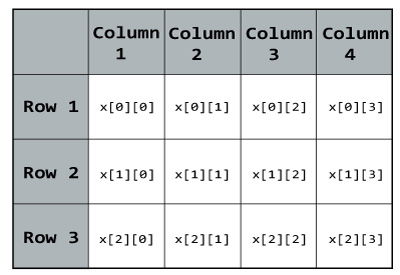
Elements in two dimensional array in C++ Programming
Three dimensional array also works in a similar way. For example:
float x[2][4][3];
This array x can hold a maximum of 24 elements. You can think this example as: Each of the 2 elements can hold 4 elements, which makes 8 elements and each of those 8 elements can hold 3 elements. Hence, total number of elements this array can hold is 24.

Multidimensional Array Initialisation

You can initialise a multidimensional array in more than one way.

Initialisation of two dimensional array

int test[2][3] = {2, 4, -5, 9, 0, 9};
Better way to initialise this array with same array elements as above.
int  test[2][3] = { {2, 4, 5}, {9, 0 0}};

Initialisation of three dimensional array

int test[2][3][4] = {3, 4, 2, 3, 0, -3, 9, 11, 23, 12, 23, 
                 2, 13, 4, 56, 3, 5, 9, 3, 5, 5, 1, 4, 9};
Better way to initialise this array with same elements as above.
int test[2][3][4] = { 
                     { {3, 4, 2, 3}, {0, -3, 9, 11}, {23, 12, 23, 2} },
                     { {13, 4, 56, 3}, {5, 9, 3, 5}, {3, 1, 4, 9} }
                 };

Example 1: Two Dimensional Array

C++ Program to display all elements of an initialised two dimensional array.
#include <iostream>
using namespace std;

int main()
{
    int test[3][2] =
    {
        {2, -5},
        {4, 0},
        {9, 1}
    };

    // Accessing two dimensional array using
    // nested for loops
    for(int i = 0; i < 3; ++i)
    {
        for(int j = 0; j < 2; ++j)
        {
            cout<< "test[" << i << "][" << j << "] = " << test[i][j] << endl;
        }
    }

    return 0;
}
Output
test[0][0] = 2
test[0][1] = -5
test[1][0] = 4
test[1][1] = 0
test[2][0] = 9
test[2][1] = 1

Example 2: Two Dimensional Array

C++ Program to store temperature of two different cities for a week and display it.
#include <iostream>
using namespace std;

const int CITY = 2;
const int WEEK = 7;

int main()
{
    int temperature[CITY][WEEK];

    cout << "Enter all temperature for a week of first city and then second city. \n";

    // Inserting the values into the temperature array
    for (int i = 0; i < CITY; ++i)
    {
        for(int j = 0; j < WEEK; ++j)
        {
            cout << "City " << i + 1 << ", Day " << j + 1 << " : ";
            cin >> temperature[i][j];
        }
    }

    cout << "\n\nDisplaying Values:\n";

    // Accessing the values from the temperature array
    for (int i = 0; i < CITY; ++i)
    {
        for(int j = 0; j < WEEK; ++j)
        {
            cout << "City " << i + 1 << ", Day " << j + 1 << " = " << temperature[i][j] << endl;
        }
    }

    return 0;
}
Output
Enter all temperature for a week of first city and then second city. 
City 1, Day 1 : 32
City 1, Day 2 : 33
City 1, Day 3 : 32
City 1, Day 4 : 34
City 1, Day 5 : 35
City 1, Day 6 : 36
City 1, Day 7 : 38
City 2, Day 1 : 23
City 2, Day 2 : 24
City 2, Day 3 : 26
City 2, Day 4 : 22
City 2, Day 5 : 29
City 2, Day 6 : 27
City 2, Day 7 : 23


Displaying Values:
City 1, Day 1 = 32
City 1, Day 2 = 33
City 1, Day 3 = 32
City 1, Day 4 = 34
City 1, Day 5 = 35
City 1, Day 6 = 36
City 1, Day 7 = 38
City 2, Day 1 = 23
City 2, Day 2 = 24
City 2, Day 3 = 26
City 2, Day 4 = 22
City 2, Day 5 = 29
City 2, Day 6 = 27
City 2, Day 7 = 23

Example 3: Three Dimensional Array

C++ Program to Store value entered by user in three dimensional array and display it.
#include <iostream>
using namespace std;

int main()
{
    // This array can store upto 12 elements (2x3x2)
    int test[2][3][2];

    cout << "Enter 12 values: \n";
    
    // Inserting the values into the test array
    // using 3 nested for loops.
    for(int i = 0; i < 2; ++i)
    {
        for (int j = 0; j < 3; ++j)
        {
            for(int k = 0; k < 2; ++k )
            {
                cin >> test[i][j][k];
            }
        }
    }

    cout<<"\nDisplaying Value stored:"<<endl;

    // Displaying the values with proper index.
    for(int i = 0; i < 2; ++i)
    {
        for (int j = 0; j < 3; ++j)
        {
            for(int k = 0; k < 2; ++k)
            {
                cout << "test[" << i << "][" << j << "][" << k << "] = " << test[i][j][k] << endl;
            }
        }
    }

    return 0;
}
Output
Enter 12 values: 
1
2
3
4
5
6
7
8
9
10
11
12

Displaying Value stored:
test[0][0][0] = 1
test[0][0][1] = 2
test[0][1][0] = 3
test[0][1][1] = 4
test[0][2][0] = 5
test[0][2][1] = 6
test[1][0][0] = 7
test[1][0][1] = 8
test[1][1][0] = 9
test[1][1][1] = 10
test[1][2][0] = 11
test[1][2][1] = 12
As the number of dimension increases, the complexity also increases tremendously although the concept is quite similar
14. C++ Arrays

C++ Arrays

In this article, you will learn to work with arrays. You will learn to declare, initialize and, access array elements in C++ programming.

C++ Arrays

In programming, one of the frequently arising problem is to handle numerous data of same type.
Consider this situation, you are taking a survey of 100 people and you have to store their age. To solve this problem in C++, you can create an integer array having 100 elements.
An array is a collection of data that holds fixed number of values of same type. For example:
int age[100];
Here, the age array can hold maximum of 100 elements of integer type.
The size and type of arrays cannot be changed after its declaration.

How to declare an array in C++?

dataType arrayName[arraySize];
For example,
float mark[5];
Here, we declared an array, mark, of floating-point type and size 5. Meaning, it can hold 5 floating-point values.

Elements of an Array and How to access them?

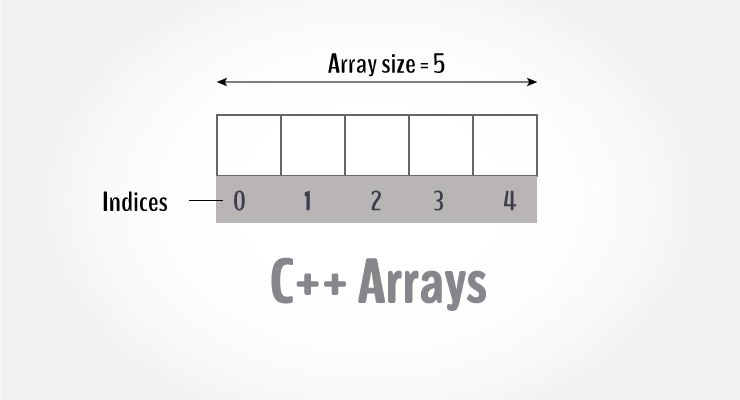
You can access elements of an array by using indices.
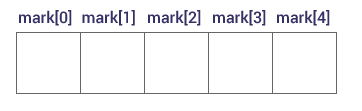
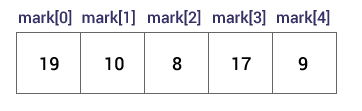
Suppose you declared an array mark as above. The first element is mark[0], second element is mark[1] and so on.
C++ Array declaration

Few key notes:

  • Arrays have 0 as the first index not 1. In this example, mark[0] is the first element.
  • If the size of an array is n, to access the last element, (n-1) index is used. In this example, mark[4] is the last element.
  • Suppose the starting address of mark[0] is 2120d. Then, the next address, a[1], will be 2124d, address of a[2] will be 2128d and so on. It's because the size of float is 4 bytes.

How to initialize an array in C++ programming?

It's possible to initialize an array during declaration. For example,
int mark[5] = {19, 10, 8, 17, 9};
Another method to initialize array during declaration:
int mark[] = {19, 10, 8, 17, 9};
Initialize an array in C programming
Here,
mark[0] is equal to 19
mark[1] is equal to 10
mark[2] is equal to 8
mark[3] is equal to 17
mark[4] is equal to 9

How to insert and print array elements?

int mark[5] = {19, 10, 8, 17, 9}

// change 4th element to 9
mark[3] = 9;

// take input from the user and insert in third element
cin >> mark[2];


// take input from the user and insert in (i+1)th element
cin >> mark[i];

// print first element of the array
cout << mark[0];

// print ith element of the array
cout >> mark[i-1];

Example: C++ Array

C++ program to store and calculate the sum of 5 numbers entered by the user using arrays.
#include <iostream>
using namespace std;

int main() 
{
    int numbers[5], sum = 0;
    cout << "Enter 5 numbers: ";
    
    //  Storing 5 number entered by user in an array
    //  Finding the sum of numbers entered
    for (int i = 0; i < 5; ++i) 
    {
        cin >> numbers[i];
        sum += numbers[i];
    }
    
    cout << "Sum = " << sum << endl;  
    
    return 0;
}
Output
Enter 5 numbers: 3
4
5
4
2
Sum = 18

Things to remember when working with arrays in C++

Suppose you declared an array of 10 elements. Let's say,
int testArray[10];
You can use the array members from testArray[0] to testArray[9].
If you try to access array elements outside of its bound, let's say testArray[14], the compiler may not show any error. However, this may cause unexpected output (undefined behavior).


13. C++ Return by Reference

C++ Return by Reference

In this article, you'll learn how to return a value by reference in a function and use it efficiently in your program.
In C++ Programming, not only can you pass values by reference to a function but you can also return a value by reference.
To understand this feature, you should have the knowledge of:
  • Global variables

Example: Return by Reference

#include <iostream>
using namespace std;

// Global variable
int num;

// Function declaration
int& test();

int main()
{
    test() = 5;

    cout << num;

    return 0;
}

int& test()
{
    return num;
}
Output
5
In program above, the return type of function test() is int&. Hence, this function returns a reference of the variable num.
The return statement is return num;. Unlike return by value, this statement doesn't return value of num, instead it returns the variable itself (address).
So, when the variable is returned, it can be assigned a value as done in test() = 5;
This stores 5 to the variable num, which is displayed onto the screen.

Important Things to Remember When Returning by Reference.

  • Ordinary function returns value but this function doesn't. Hence, you cannot return a constant from the function.
    int& test() {
        return 2;
    }
  • You cannot return a local variable from this function.
    int& test()
    {
        int n = 2; 
        return n; 
    }


12. C++ Recursion

C++ Recursion

In this article, you will learn to create a recursive function; a function that calls itself.

C++ recursion

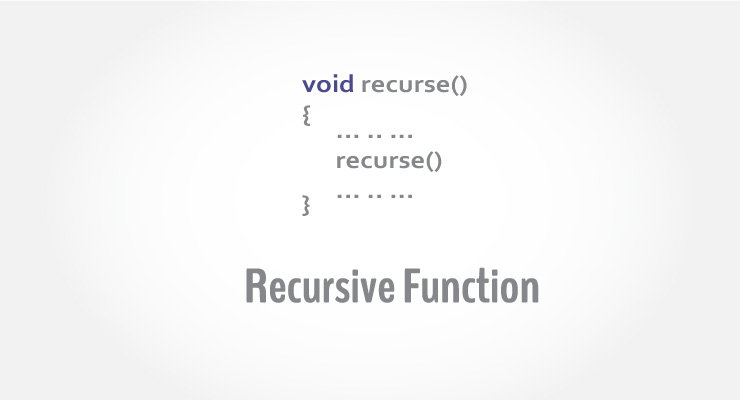
A function that calls itself is known as recursive function. And, this technique is known as recursion.

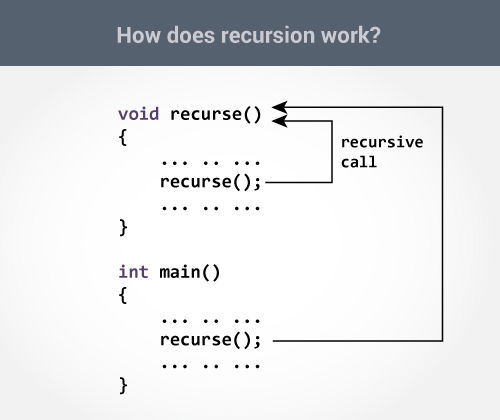
How recursion works in C++?

void recurse()
{
    ... .. ...
    recurse();
    ... .. ...
}

int main()
{
    ... .. ...
    recurse();
    ... .. ...
}
The figure below shows how recursion works by calling itself over and over again.
How recursion works in C++ programming?
The recursion continues until some condition is met.
To prevent infinite recursion, if...else statement (or similar approach) can be used where one branch makes the recursive call and other doesn't.

Example 1: Factorial of a Number Using Recursion

// Factorial of n = 1*2*3*...*n

#include <iostream>
using namespace std;

int factorial(int);

int main() 
{
    int n;
    cout<<"Enter a number to find factorial: ";
    cin >> n;
    cout << "Factorial of " << n <<" = " << factorial(n);
    return 0;
}

int factorial(int n) 
{
    if (n > 1) 
    {
        return n*factorial(n-1);
    }
    else 
    {
        return 1;
    }
}
Output
Enter a number to find factorial: 4
Factorial of 4 = 24

Explanation: How this example works?

How recursion works in C++ programming?
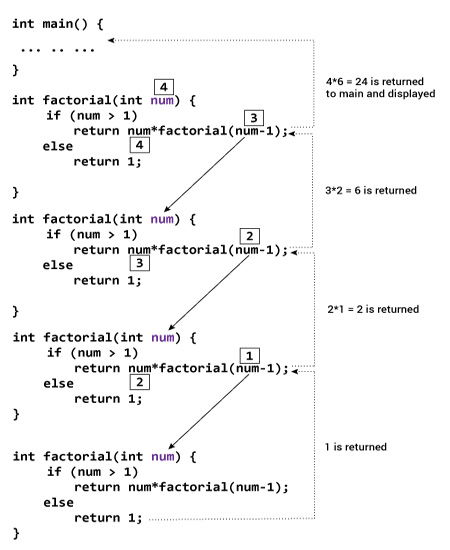
Suppose the user entered 4, which is passed to the factorial() function.
  1. In the first factorial() function, test expression inside if statement is true. The return num*factorial(num-1); statement is executed, which calls the second factorial()function and argument passed is num-1which is 3.
     
  2. In the second factorial() function, test expression inside if statement is true. The return num*factorial(num-1); statement is executed, which calls the third factorial()function and argument passed is num-1 which is 2.
     
  3. In the third factorial() function, test expression inside if statement is true. The return num*factorial(num-1); statement is executed, which calls the fourth factorial() function and argument passed is num-1 which is 1.
     
  4. In the fourth factorial() function, test expression inside if statement is false. The return 1; statement is executed, which returns 1 to third factorial() function.
     
  5. The third factorial() function returns 2 to the second factorial() function.
     
  6. The second factorial() function returns 6 to the first factorial() function.
     
  7. Finally, the first factorial() function returns 24 to the main() function, which is displayed on the screen.


11. C++ Storage Class

C++ Storage Class

In this article, you'll learn about different storage classes in C++. Namely: local, global, static local, register and thread local.

C++ storage class

Every variable in C++ has two features: type and storage class.
Type specifies the type of data that can be stored in a variable. For example: intfloatchar etc.
And, storage class controls two different properties of a variable: lifetime (determines how long a variable can exist) and scope (determines which part of the program can access it).
Depending upon the storage class of a variable, it can be divided into 4 major types:
  • Local variable
  • Global variable
  • Static local variable
  • Register Variable
  • Thread Local Storage

Local Variable

A variable defined inside a function (defined inside function body between braces) is called a local variable or automatic variable.
Its scope is only limited to the function where it is defined. In simple terms, local variable exists and can be accessed only inside a function.
The life of a local variable ends (It is destroyed) when the function exits.

Example 1: Local variable

#include <iostream>
using namespace std;

void test();

int main() 
{
    // local variable to main()
    int var = 5;

    test();
    
    // illegal: var1 not declared inside main()
    var1 = 9;
}

void test()
{
    // local variable to test()
    int var1;
    var1 = 6;

    // illegal: var not declared inside test()
    cout << var;
}

The variable var cannot be used inside test() and var1 cannot be used inside main()function.
Keyword auto was also used for defining local variables before as: auto int var;
But, after C++11 auto has a different meaning and should not be used for defining local variables.

Global Variable

If a variable is defined outside all functions, then it is called a global variable.
The scope of a global variable is the whole program. This means, It can be used and changed at any part of the program after its declaration.
Likewise, its life ends only when the program ends.

Example 2: Global variable

#include <iostream>
using namespace std;

// Global variable declaration
int c = 12;

void test();

int main()
{
    ++c;

    // Outputs 13
    cout << c <<endl;
    test();

    return 0;
}

void test()
{
    ++c;

    // Outputs 14
    cout << c;
}
Output
13
14
In the above program, c is a global variable.
This variable is visible to both functions main() and test() in the above program.

Static Local variable

Keyword static is used for specifying a static variable. For example:
... .. ...
int main()
{
   static float a;
   ... .. ...
}
A static local variable exists only inside a function where it is declared (similar to a local variable) but its lifetime starts when the function is called and ends only when the program ends.
The main difference between local variable and static variable is that, the value of static variable persists the end of the program.

Example 3: Static local variable

#include <iostream>
using namespace std;

void test()
{
    // var is a static variable
    static int var = 0;
    ++var;

    cout << var << endl;
}

int main()
{
    
    test();
    test();

    return 0;
}
Output
1
2
In the above program, test() function is invoked 2 times.
During the first call, variable var is declared as static variable and initialized to 0. Then 1 is added to var which is displayed in the screen.
When the function test() returns, variable var still exists because it is a static variable.
During second function call, no new variable var is created. The same var is increased by 1 and then displayed to the screen.
Output of above program if var was not specified as static variable
1
1

Register Variable (Deprecated in C++11)

Keyword register is used for specifying register variables.
Register variables are similar to automatic variables and exists inside a particular function only. It is supposed to be faster than the local variables.
If a program encounters a register variable, it stores the variable in processor's register rather than memory if available. This makes it faster than the local variables.
However, this keyword was deprecated in C++11 and should not be used.

Thread Local Storage

Thread-local storage is a mechanism by which variables are allocated such that there is one instance of the variable per extant thread.
Keyword thread_local is used for this purpose.
Learn more about thread local storage.


10. C++ Programming Default Arguments (Parameters)

C++ Programming Default Arguments (Parameters)

In this article, you'll learn what are default arguments, how are they used and necessary declaration for its use.

C++ Programming Default Argument

In C++ programming, you can provide default values for function parameters.
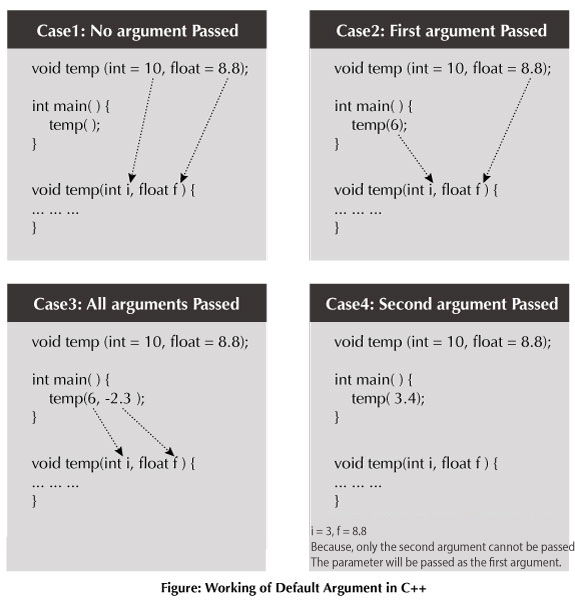
The idea behind default argument is simple. If a function is called by passing argument/s, those arguments are used by the function.
But if the argument/s are not passed while invoking a function then, the default values are used.
Default value/s are passed to argument/s in the function prototype.

Working of default arguments

Default arguments in C++

Example: Default Argument

// C++ Program to demonstrate working of default argument

#include <iostream>
using namespace std;

void display(char = '*', int = 1);

int main()
{
    cout << "No argument passed:\n";
    display();
    
    cout << "\nFirst argument passed:\n";
    display('#');
    
    cout << "\nBoth argument passed:\n";
    display('$', 5);

    return 0;
}

void display(char c, int n)
{
    for(int i = 1; i <= n; ++i)
    {
        cout << c;
    }
    cout << endl;
}
Output
No argument passed:
*

First argument passed:
#

Both argument passed:
$$$$$
In the above program, you can see the default value assigned to the arguments void display(char = '*', int = 1);.
At first, display() function is called without passing any arguments. In this case, display()function used both default arguments c = * and n = 1.
Then, only the first argument is passed using the function second time. In this case, function does not use first default value passed. It uses the actual parameter passed as the first argument c = # and takes default value n = 1 as its second argument.
When display() is invoked for the third time passing both arguments, default arguments are not used. So, the value of c = $ and n = 5.

Common mistakes when using Default argument

  1. void add(int a, int b = 3, int c, int d = 4);

    The above function will not compile. You cannot miss a default argument in between two arguments.
    In this case, c should also be assigned a default value.
     
  2. void add(int a, int b = 3, int c, int d);

    The above function will not compile as well. You must provide default values for each argument after b.
    In this case, c and d should also be assigned default values.
    If you want a single default argument, make sure the argument is the last one. void add(int a, int b, int c, int d = 4);
     
  3. No matter how you use default arguments, a function should always be written so that it serves only one purpose.
    If your function does more than one thing or the logic seems too complicated, you can use Function overloading to separate the logic better.


9. C++ Function Overloading

C++ Function Overloading

Two or more functions having same name but different argument(s) are known as overloaded functions. In this article, you will learn about function overloading with examples.

C++ Function Overloading

Function refers to a segment that groups code to perform a specific task.
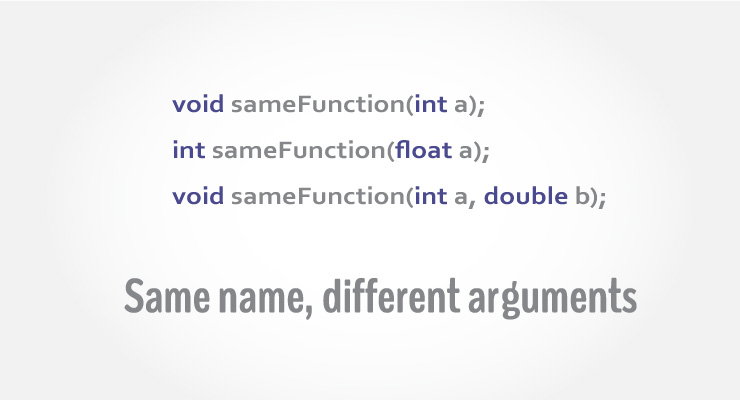
In C++ programming, two functions can have same name if number and/or type of arguments passed are different.
These functions having different number or type (or both) of parameters are known as overloaded functions. For example:
int test() { }
int test(int a) { }
float test(double a) { }
int test(int a, double b) { }
Here, all 4 functions are overloaded functions because argument(s) passed to these functions are different.
Notice that, the return type of all these 4 functions are not same. Overloaded functions may or may not have different return type but it should have different argument(s).
// Error code
int test(int a) { }
double test(int b){ }
The number and type of arguments passed to these two functions are same even though the return type is different. Hence, the compiler will throw error.

Example 1: Function Overloading

#include <iostream>
using namespace std;

void display(int);
void display(float);
void display(int, float);

int main() {

    int a = 5;
    float b = 5.5;

    display(a);
    display(b);
    display(a, b);

    return 0;
}

void display(int var) {
    cout << "Integer number: " << var << endl;
}

void display(float var) {
    cout << "Float number: " << var << endl;
}

void display(int var1, float var2) {
    cout << "Integer number: " << var1;
    cout << " and float number:" << var2;
}
Output
Integer number: 5
Float number: 5.5
Integer number: 5 and float number: 5.5
Here, the display() function is called three times with different type or number of arguments.
The return type of all these functions are same but it's not necessary.

Example 2: Function Overloading

// Program to compute absolute value
// Works both for integer and float

#include <iostream>
using namespace std;

int absolute(int);
float absolute(float);

int main() {
    int a = -5;
    float b = 5.5;
    
    cout << "Absolute value of " << a << " = " << absolute(a) << endl;
    cout << "Absolute value of " << b << " = " << absolute(b);
    return 0;
}

int absolute(int var) {
     if (var < 0)
         var = -var;
    return var;
}

float absolute(float var){
    if (var < 0.0)
        var = -var;
    return var;
}
Output
Absolute value of -5 = 5
Absolute value of 5.5 = 5.5
In the above example, two functions absolute() are overloaded.
Both functions take single argument. However, one function takes integer as an argument and other takes float as an argument.
When absolute() function is called with integer as an argument, this function is called:
int absolute(int var) {
     if (var < 0)
         var = -var;
    return var;
}
When absolute() function is called with float as an argument, this function is called:
float absolute(float var){
    if (var < 0.0)
        var = -var;
    return var;
}


8. Types of User-defined Functions in C++

Types of User-defined Functions in C++

In this tutorial, you will learn about different approaches you can take to solve a single problem using functions.

C++ User-defined Function Types

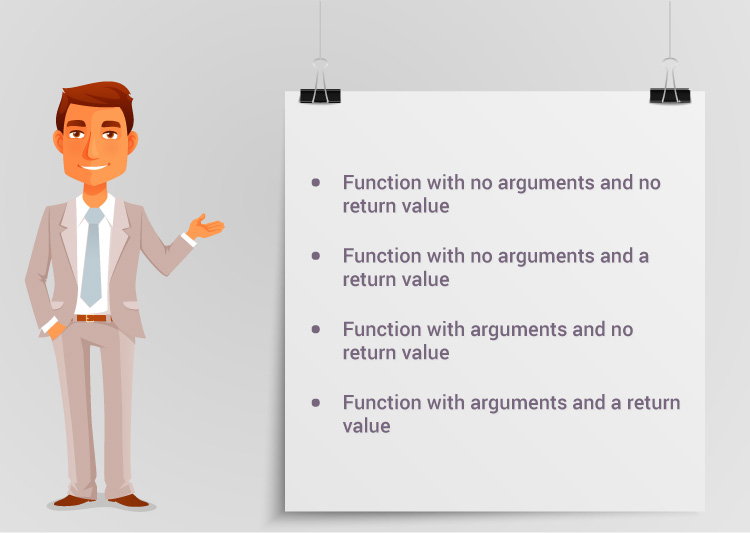
For better understanding of arguments and return in functions, user-defined functions can be categorised as:
  • Function with no argument and no return value
  • Function with no argument but return value
  • Function with argument but no return value
  • Function with argument and return value
Consider a situation in which you have to check prime number. This problem is solved below by making user-defined function in 4 different ways as mentioned above.

Example 1: No arguments passed and no return value

# include <iostream>
using namespace std;

void prime();

int main()
{
    // No argument is passed to prime()
    prime();
    return 0;
}


// Return type of function is void because value is not returned.
void prime()
{

    int num, i, flag = 0;

    cout << "Enter a positive integer enter to check: ";
    cin >> num;

    for(i = 2; i <= num/2; ++i)
    {
        if(num % i == 0)
        {
            flag = 1; 
            break;
        }
    }

    if (flag == 1)
    {
        cout << num << " is not a prime number.";
    }
    else
    {
        cout << num << " is a prime number.";
    }
}
In the above program, prime() is called from the main() with no arguments.
prime() takes the positive number from the user and checks whether the number is a prime number or not.
Since, return type of prime() is void, no value is returned from the function.

Example 2: No arguments passed but a return value

#include <iostream>
using namespace std;

int prime();

int main()
{
    int num, i, flag = 0;

    // No argument is passed to prime()
    num = prime();
    for (i = 2; i <= num/2; ++i)
    {
        if (num%i == 0)
        {
            flag = 1;
            break;
        }
    }

    if (flag == 1)
    {
        cout<<num<<" is not a prime number.";
    }
    else
    {
        cout<<num<<" is a prime number.";
    }
    return 0;
}

// Return type of function is int
int prime()
{
    int n;

    printf("Enter a positive integer to check: ");
    cin >> n;

    return n;
}
In the above program, prime() function is called from the main() with no arguments.
prime() takes a positive integer from the user. Since, return type of the function is an int, it returns the inputted number from the user back to the calling main() function.
Then, whether the number is prime or not is checked in the main() itself and printed onto the screen.

Example 3: Arguments passed but no return value

#include <iostream>
using namespace std;

void prime(int n);

int main()
{
    int num;
    cout << "Enter a positive integer to check: ";
    cin >> num;
    
    // Argument num is passed to the function prime()
    prime(num);
    return 0;
}

// There is no return value to calling function. Hence, return type of function is void. */
void prime(int n)
{
    int i, flag = 0;
    for (i = 2; i <= n/2; ++i)
    {
        if (n%i == 0)
        {
            flag = 1;
            break;
        }
    }

    if (flag == 1)
    {
        cout << n << " is not a prime number.";
    }
    else {
        cout << n << " is a prime number.";
    }
}
In the above program, positive number is first asked from the user which is stored in the variable num.
Then, num is passed to the prime() function where, whether the number is prime or not is checked and printed.
Since, the return type of prime() is a void, no value is returned from the function.

Example 4: Arguments passed and a return value.

#include <iostream>
using namespace std;

int prime(int n);

int main()
{
    int num, flag = 0;
    cout << "Enter positive integer to check: ";
    cin >> num;

    // Argument num is passed to check() function
    flag = prime(num);

    if(flag == 1)
        cout << num << " is not a prime number.";
    else
        cout<< num << " is a prime number.";
    return 0;
}

/* This function returns integer value.  */
int prime(int n)
{
    int i;
    for(i = 2; i <= n/2; ++i)
    {
        if(n % i == 0)
            return 1;
    }

    return 0;
}
In the above program, a positive integer is asked from the user and stored in the variable num.
Then, num is passed to the function prime() where, whether the number is prime or not is checked.
Since, the return type of prime() is an int, 1 or 0 is returned to the main() calling function. If the number is a prime number, 1 is returned. If not, 0 is returned.
Back in the main() function, the returned 1 or 0 is stored in the variable flag, and the corresponding text is printed onto the screen.

Which method is better?

All four programs above gives the same output and all are technically correct program.
There is no hard and fast rule on which method should be chosen.
The particular method is chosen depending upon the situation and how you want to solve a problem.


7. C++ Functions

C++ Functions

In this article, you'll learn everything about functions in C++; what type of functions are there, how to use them with examples.

C++ Functions

In programming, function refers to a segment that groups code to perform a specific task.
Depending on whether a function is predefined or created by programmer; there are two types of function:
  1. Library Function
  2. User-defined Function

Library Function

Library functions are the built-in function in C++ programming.
Programmer can use library function by invoking function directly; they don't need to write it themselves.

Example 1: Library Function

#include <iostream>
#include <cmath>

using namespace std;

int main()
{
    double number, squareRoot;
    cout << "Enter a number: ";
    cin >> number;

    // sqrt() is a library function to calculate square root
    squareRoot = sqrt(number);
    cout << "Square root of " << number << " = " << squareRoot;
    return 0;
}
Output
Enter a number: 26
Square root of 26 = 5.09902
In the example above, sqrt() library function is invoked to calculate the square root of a number.
Notice code #include <cmath> in the above program. Here, cmath is a header file. The function definition of sqrt()(body of that function) is present in the cmath header file.
You can use all functions defined in cmath when you include the content of file cmath in this program using #include <cmath> .
Every valid C++ program has at least one function, that is, main() function.

User-defined Function

C++ allows programmer to define their own function.
A user-defined function groups code to perform a specific task and that group of code is given a name(identifier).
When the function is invoked from any part of program, it all executes the codes defined in the body of function.

How user-defined function works in C Programming?

Working of function in C++ programming
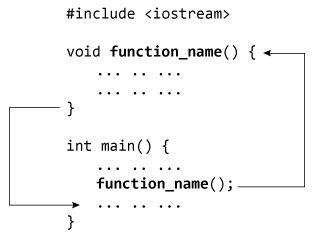
Consider the figure above.
When a program begins running, the system calls the main() function, that is, the system starts executing codes from main() function.
When control of the program reaches to function_name() inside main(), it moves to void function_name() and all codes inside void function_name() is executed.
Then, control of the program moves back to the main function where the code after the call to the function_name() is executed as shown in figure above.

Example 2: User Defined Function

C++ program to add two integers. Make a function add() to add integers and display sum in main() function.
#include <iostream>
using namespace std;

// Function prototype (declaration)
int add(int, int);

int main()
{
    int num1, num2, sum;
    cout<<"Enters two numbers to add: ";
    cin >> num1 >> num2;

    // Function call
    sum = add(num1, num2);
    cout << "Sum = " << sum;
    return 0;
}

// Function definition
int add(int a, int b)
{
    int add;
    add = a + b;

    // Return statement
    return add;
}
Output
Enters two integers: 8
-4
Sum = 4

Function prototype (declaration)

If a user-defined function is defined after main() function, compiler will show error. It is because compiler is unaware of user-defined function, types of argument passed to function and return type.
In C++, function prototype is a declaration of function without its body to give compiler information about user-defined function. Function prototype in the above example is:
int add(int, int);
You can see that, there is no body of function in prototype. Also, there are only return type of arguments but no arguments. You can also declare function prototype as below but it's not necessary to write arguments.
int add(int a, int b);
Note: It is not necessary to define prototype if user-defined function exists before main()function.

Function Call

To execute the codes of function body, the user-defined function needs to be invoked(called).
In the above program, add(num1,num2); inside main() function calls the user-defined function.
The function returns an integer which is stored in variable add.

Function Definition

The function itself is referred as function definition. Function definition in the above program is:
// Function definition
int add(int a,int b)
{
    int add;
    add = a + b;
    return add;
}
When the function is called, control is transferred to the first statement of the function body.
Then, other statements in function body are executed sequentially.
When all codes inside function definition is executed, control of program moves to the calling program.

Passing Arguments to Function

In programming, argument (parameter) refers to the data which is passed to a function (function definition) while calling it.
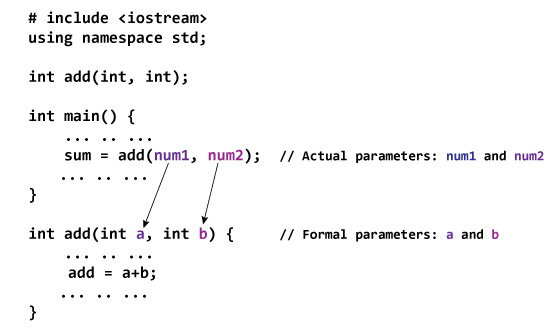
In the above example, two variables, num1 and num2 are passed to function during function call. These arguments are known as actual arguments.
The value of num1 and num2 are initialized to variables a and b respectively. These arguments a and b are called formal arguments.
This is demonstrated in figure below:
Passing argument to a function in C++ programming
Notes on passing arguments
  • The numbers of actual arguments and formals argument should be the same. (Exception: Function Overloading)
  • The type of first actual argument should match the type of first formal argument. Similarly, type of second actual argument should match the type of second formal argument and so on.
  • You may call function a without passing any argument. The number(s) of argument passed to a function depends on how programmer want to solve the problem.
  • You may assign default values to the argument. These arguments are known as default arguments.
  • In the above program, both arguments are of int type. But it's not necessary to have both arguments of same type.

Return Statement

A function can return a single value to the calling program using return statement.
In the above program, the value of add is returned from user-defined function to the calling program using statement below:
return add;
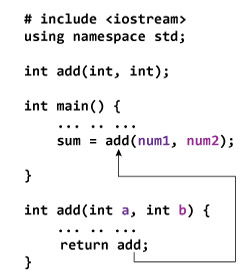
The figure below demonstrates the working of return statement.
Returning value from a function in C++ programming.
In the above program, the value of add inside user-defined function is returned to the calling function. The value is then stored to a variable sum.
Notice that the variable returned, i.e., add is of type int and sum is also of int type.
Also, notice that the return type of a function is defined in function declarator int add(int a, int b). The int before add(int a, int b) means the function should return a value of typeint.
If no value is returned to the calling function then, void should be used.


6. C++ goto Statement

C++ goto Statement

In this article, you'll learn about goto statment, how it works and why should it be avoided.

C++ goto statement

In C++ programming, goto statement is used for altering the normal sequence of program execution by transferring control to some other part of the program.

Syntax of goto Statement

goto label;
... .. ...
... .. ...
... .. ...
label: 
statement;
... .. ...
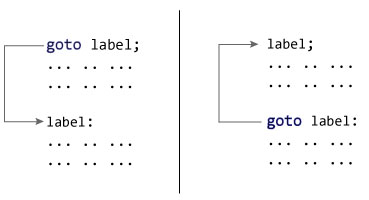
In the syntax above, label is an identifier. When goto label; is encountered, the control of program jumps to label: and executes the code below it.
Working of goto statement in C++ programming

Example: goto Statement

// This program calculates the average of numbers entered by user.
// If user enters negative number, it ignores the number and 
// calculates the average of number entered before it.

# include <iostream>
using namespace std;

int main()
{
    float num, average, sum = 0.0;
    int i, n;

    cout << "Maximum number of inputs: ";
    cin >> n;

    for(i = 1; i <= n; ++i)
    {
        cout << "Enter n" << i << ": ";
        cin >> num;
        
        if(num < 0.0)
        {
           // Control of the program move to jump:
            goto jump;
        } 
        sum += num;
    }
    
jump:
    average = sum / (i - 1);
    cout << "\nAverage = " << average;
    return 0;
}
Output
Maximum number of inputs: 10
Enter n1: 2.3
Enter n2: 5.6
Enter n3: -5.6

Average = 3.95
You can write any C++ program without the use of goto statement and is generally considered a good idea not to use them.

Reason to Avoid goto Statement

The goto statement gives power to jump to any part of program but, makes the logic of the program complex and tangled.
In modern programming, goto statement is considered a harmful construct and a bad programming practice.
The goto statement can be replaced in most of C++ program with the use of break and continue statements.


5. C++ switch..case Statement

C++ switch..case Statement

In this article, you will learn to create a switch statement in C++ programming (with an example).
C++ switch case statement
The ladder if..else..if statement allows you to execute a block code among many alternatives. If you are checking on the value of a single variable in ladder if..else..if, it is better to use switch statement.
The switch statement is often faster than if...else (not always). Also, the syntax of switch statement is cleaner and easier to understand.

C++ switch...case syntax

switch (n)
​{
    case constant1:
        // code to be executed if n is equal to constant1;
        break;

    case constant2:
        // code to be executed if n is equal to constant2;
        break;
        .
        .
        .
    default:
        // code to be executed if n doesn't match any constant
}
When a case constant is found that matches the switch expression, control of the program passes to the block of code associated with that case.
In the above pseudocode, suppose the value of n is equal to constant2. The compiler will execute the block of code associated with the case statement until the end of switch block, or until the break statement is encountered.
The break statement is used to prevent the code running into the next case.

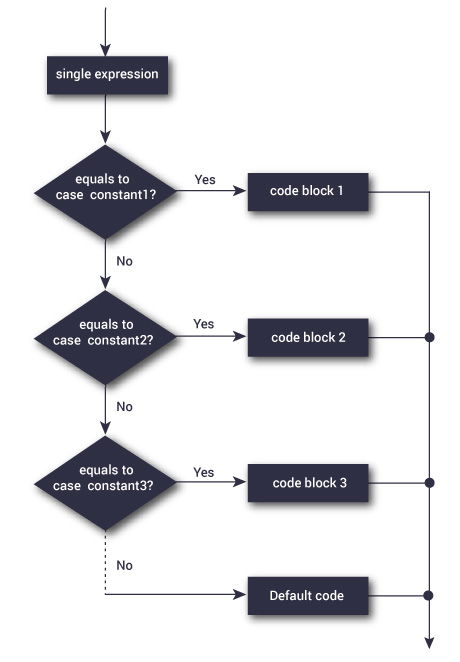
Flowchart of switch Statement

Flowchart of switch case statement in C++ Programming
The above figure shows how a switch statement works and conditions are checked within the switch case clause.

Example: C++ switch Statement

// Program to built a simple calculator using switch Statement

#include <iostream>
using namespace std;

int main()
{
    char o;
    float num1, num2;

    cout << "Enter an operator (+, -, *, /): ";
    cin >> o;

    cout << "Enter two operands: ";
    cin >> num1 >> num2;
    
    switch (o) 
    {
        case '+':
            cout << num1 << " + " << num2 << " = " << num1+num2;
            break;
        case '-':
            cout << num1 << " - " << num2 << " = " << num1-num2;
            break;
        case '*':
            cout << num1 << " * " << num2 << " = " << num1*num2;
            break;
        case '/':
            cout << num1 << " / " << num2 << " = " << num1/num2;
            break;
        default:
            // operator is doesn't match any case constant (+, -, *, /)
            cout << "Error! operator is not correct";
            break;
    }
    
    return 0;
}
Output
Enter an operator (+, -, *, /): +
-
Enter two operands: 2.3
4.5
2.3 - 4.5 = -2.2
The - operator entered by the user is stored in o variable. And, two operands 2.3 and 4.5 are stored in variables num1 and num2 respectively.
Then, the control of the program jumps to
cout << num1 << " - " << num2 << " = " << num1-num2;
Finally, the break statement ends the switch statement.
If break statement is not used, all cases after the correct case is executed.